HTTP status codes
A comprehensive guide to HTTP status codes and their meanings in web development.
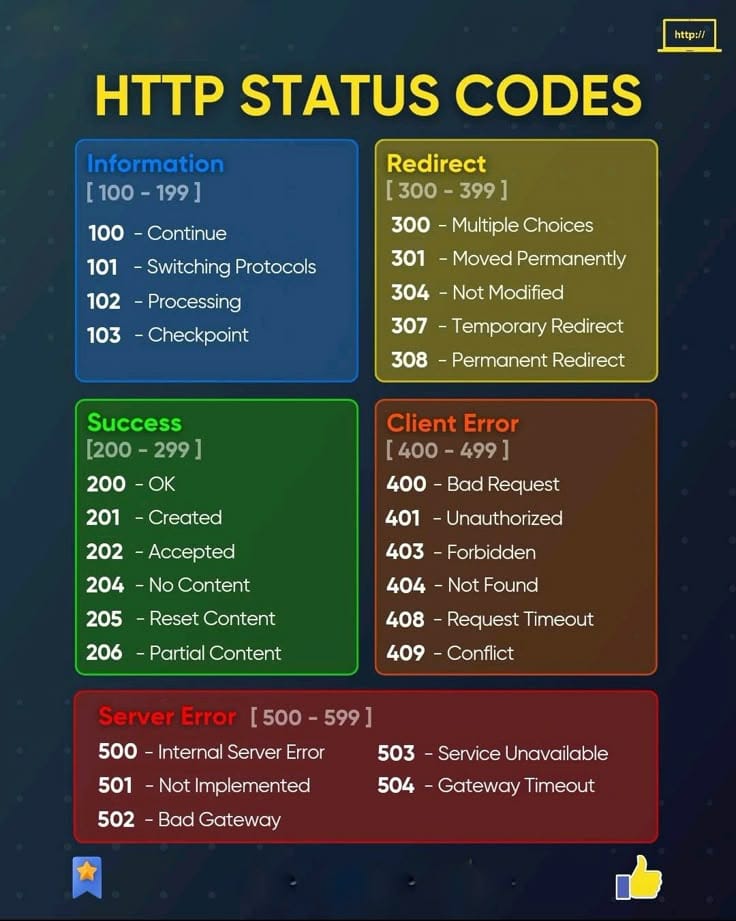
HTTP status codes are three-digit numbers returned by a server in response to a client's request. In this article, I provide a comprehensive guide to the most commonly encountered HTTP status codes and their meanings in web development. I cover informational, success, redirection, client error, and server error status codes, explaining when and how to use each one effectively. Understanding these codes is essential for debugging and optimizing web applications. Whether you're new to web development or looking to refresh your knowledge, this article will help you navigate the world of HTTP status codes with confidence. I also discuss best practices for handling errors and providing meaningful responses to clients based on the status codes returned by your server.
1xx Informational
- 100 Continue — Client can continue sending the request body
- 101 Switching Protocols — Server agrees to switch protocol (eg HTTP to WebSocket)
- 102 Processing — Server has received and is processing the request
- 103 Early Hints — Sends preliminary headers before the final response
2xx Success
- 200 OK — The request has successfully fulfilled
- 201 Created — The request has been fulfilled and resulted in a new resource being created
- 202 Accepted — The request has been accepted for processing, but the processing has not been completed
- 203 Non-Authoritative Information — The request was successful but the returned content may be from another source
- 204 No Content — The server has successfully fulfilled the request and there is no additional content to send in the response payload body
- 205 Reset Content — Client should reset the document view
- 206 Partial Content — Only part of the response is returned
- 207 Multi-Status — Multi status code for different resources (WebDAV)
- 208 Already Reported — Resource already reported (WebDAV)
- 226 IM Used — Response is a delta encoding of the resource
3xx Redirection
- 300 Multiple Choice — Multiple possible responses exist
- 301 Moved Permanently — Resource has permanently moved
- 302 Found — Resource temporarily located elsewhere
- 303 See Other — Retrieve the resource using GET at another URI
- 304 Not Modified — Cached version is still valid
- 305 Use Proxy — (Deprecated) Resource must be accessed through a proxy
- 306 Unused — Reserved: no longer used
- 307 Temporary Redirect — The target resource has been assigned a new permanent URI
- 308 Permanent Redirect — The server could not understand the request due to invalid syntax
4xx Client Error
- 400 Bad Request — The server encountered a condition it didn't know how to handle
- 401 Unauthorized — The client must authenticate itself to get the requested response
- 402 Payment Required — Payment is required to proceed
- 403 Forbidden — The client does not have access rights to the content
- 404 Not Found — The server can not find the requested resource
- 405 Method Not Allowed — The server understands the request method but the target resource does not support it for the requested endpoint
- 406 Not Acceptable — Cannot produce a response matching the client's accept header
- 407 Proxy Authentication Required — Authentication with the proxy is required
- 408 Request Timeout — Client took too long to send the request
- 409 Conflict — The request could not be completed due to a conflict with the current state of the target resource
- 410 Gone — Resources have been permanently removed
- 411 Length Required — Content-Length header is required
- 412 Precondition Failed — Precondition in the request were not met
- 413 Payload Too Large — The request was well-formed but was unable to be followed due to semantic errors
- 414 URI Too Long — Request URI is longer than the server allows
- 415 Unsupported Media Type — Request format is not supported
- 416 Range Not Satisfiable — Request byte range is invalid
- 417 Expectation Failed — Server cannot satisfy the expect header
- 418 I'm a Teapot — April's Fools' joke status code; rarely used
- 421 Misdirected Request — Request sent to the wrong server
- 422 Unprocessable Entity — The request was well-formed but was unable to be followed due to semantic errors
- 423 Locked — Resource is locked (WebDAV)
- 424 Failed Dependency — Request failed because another request failed (WebDAV)
- 425 Too Early — Server is unwilling to process a replay-prone request
- 426 Upgrade Required — Client must upgrade to another protocol
- 428 Precondition Required — Server requires conditional requests
- 429 Too Many Requests — The user has sent too many requests in a given amount of time
- 431 Request Header Fields Too Large — Request headers are too large
- 451 Unavailable For Legal Reasons — Resource blocked due to legal restrictions
5xx Server Error
- 500 Internal Server Error — The server encountered a situation it doesn't know how to handle
- 501 Not Implemented — The server does not support the functionality required to fulfill the request
- 502 Bad Gateway — The server, while acting as a gateway or proxy, received an invalid response from the upstream server it accessed in attempting to fulfill the request
- 503 Service Unavailable — The server is currently unable to handle the request due to a temporary overload or scheduled maintenance
- 504 Gateway Timeout — The server, while acting as a gateway or proxy, did not receive a timely response from the upstream server it needed to access in order to complete the request
- 505 HTTP Version Not Supported — HTTP version is unsupported
- 506 Variant Also Negotiates — Configuration error in content negotiation
- 507 Insufficient Storage — Server lacks storage to complete the request (WebDAV)
- 508 Loop Detected — Infinite loop detected while processing (WebDAV)
- 510 Not Extended — Additional extensions are required to fulfill the request
- 511 Network Authentication Required — Client must authenticate to access the network